Using Rize Effectively
The best way to use Rize is simple: track in the background, review quickly, and teach the system
The teams that get the most value from Rize do not treat it like a timer app. They set up structure first, review suggestions daily for a short period, and let the system learn. This guide is optimized for agency team admins first, with notes for freelancers and solo operators where the workflow differs.
The core workflow
Install Rize and turn on the right tracking inputs
Install the desktop app, browser extension, and any calendar or task integrations you need. Good input data is the foundation for good suggestions.
Create your data model
Set up the clients, projects, tasks, and rules your team actually uses. If the structure is messy or incomplete, the AI has fewer good options to tag against.
Let Rize track work in the background
Rize captures active-window metadata and creates live time entries as you work. When you switch contexts, entries are finalized into AI suggestions with descriptions and tag recommendations.
Review and correct time entries daily
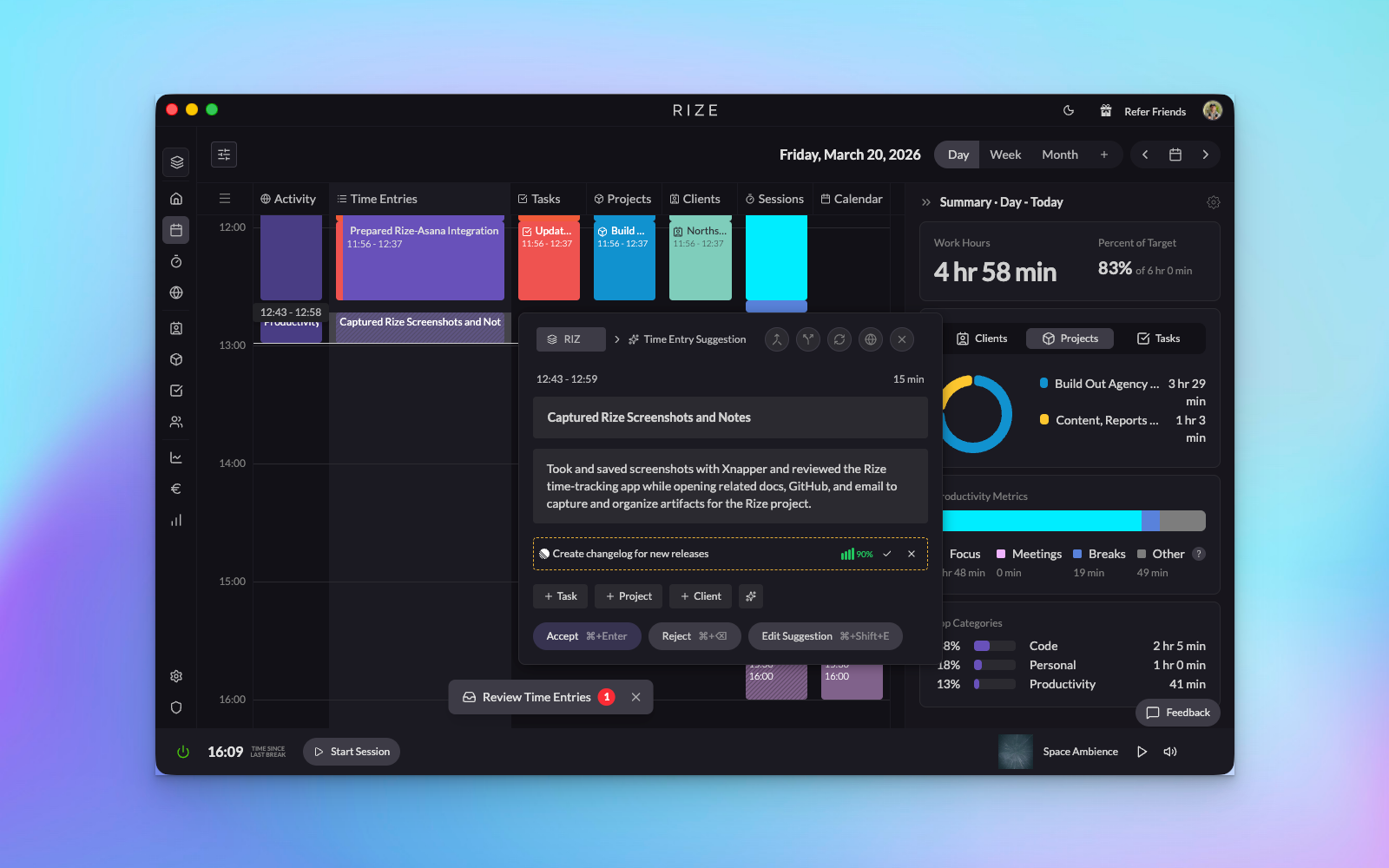
Click an entry on the day calendar to open the Review Panel. Accept what is right, fix what is not. Those corrections are the fastest way to improve future suggestions.
Use clean data for reporting and profitability
Once the tagging workflow is stable, dashboards, reports, billable settings, budgets, and profitability become much more useful and trustworthy.
Put an assistant on top of it
Ask the Rize agent questions in-app, schedule reports that land in your inbox, or connect Claude and ChatGPT to your workspace over MCP. All three read the same clean data, which is why this step comes last rather than first.
For agency and team admins
1. Set expectations before inviting the team
- Explain that Rize tracks metadata only: app name, window title, URL, and timestamps.
- Make it explicit that Rize does not take screenshots or record keystrokes.
- Decide who will own workspace setup, billing settings, and integration management.
2. Configure the workspace before rollout
- Create the workspace and invite the right members.
- Choose a billing strategy and set default rates or cost model.
- Connect ClickUp, Linear, or Asana before asking people to rely on auto-tagging.
- Add shared clients, projects, and tasks so the AI has real targets.
3. Prioritize tagging accuracy in the first week
- Review entries via the Review Panel on the day calendar every day.
- Add keywords and tracking rules when recurring patterns show up.
- Use synced tasks from your task tracker instead of relying on free-text work where possible.
- Leave the auto-approve threshold conservative to start. Lower it only once people stop correcting suggestions — automating a tagging model that is still wrong just moves the cleanup downstream.
- Write custom instructions once you can name the mistake. "Anything in Figma belongs to the client whose name is in the file title" is useful; "be more accurate" is not.
4. Move into admin reporting
- Review client, project, and member-level data.
- Set budgets, billable rules, and profitability inputs.
- Build dashboard views for utilization, pending time, client health, and workload allocation.
5. Add the assistant layer
- Use Rize AI in the app for ad-hoc questions about tracked time.
- Schedule reports so weekly reviews arrive without anyone running them.
- Connect the MCP server if your team already works in Claude, ChatGPT, or Cursor — it exposes time entries, allocation, keywords, contracts, and profitability to those clients under each person's own permissions.
For freelancers and solo operators
- Create clients and projects early, even if the list is short. The AI can only tag against entities that exist.
- Use tracking rules and keywords to help Rize distinguish overlapping work — especially when two clients live in the same three apps.
- Review entries via the Review Panel daily until suggestions become dependable. Ten minutes a day for a week beats an hour of reconstruction on Friday.
- Set hourly rates on clients and projects up front so billable totals are usable the first time you invoice, not after a cleanup pass.
- Use reports and exports to make invoicing easier without rebuilding your week from memory.
Is it actually working?
Rollout guides tend to stop at "do the setup." These are the checks that tell you whether the loop is closing:
Correction rate is falling
Week over week, you should be changing fewer tags in the Review Panel. Flat or rising correction rates mean the structure or the rules are wrong — not that the AI needs another week.
Nothing is piling up
A growing backlog of pending suggestions is the leading indicator of a failed rollout. Work Hours are calculated from approved and pending entries by default, so an unreviewed backlog quietly distorts them too.
Untagged time is shrinking
Check allocation for time landing on no client or project. That bucket is where billable hours go to die, and it is usually one missing keyword rule away from being fixed.
Reports need no cleanup
If a profitability or utilization report still needs manual fixing before you would show it to anyone, the tagging workflow is not stable yet. Fix that before adding more automation on top.
When accuracy is not improving
Work through these in order — the earlier ones are the more common causes:
- Structure is missing. The AI can only pick from clients, projects, and tasks that exist. Check whether the work people are doing has somewhere to land.
- Rules are missing. Recurring, unambiguous patterns — a client's Slack channel, a project's repo, a recurring meeting — should be client, project, and task keywords, not something the AI re-guesses every day.
- Input data is thin. No browser extension means no URLs. No calendar connection means meetings arrive as unexplained gaps. Both make suggestions worse in ways that look like an AI problem.
- Review is too slow. Corrections made days later are worth less than corrections made the same day, because the person no longer remembers what they were doing either.
- Automation was turned up too early. If the auto-approve threshold was lowered while corrections were still frequent, wrong tags are now being approved without anyone seeing them. Raise it back and re-review.
What “good setup” looks like
Accuracy is improving each day
Suggestions increasingly arrive with the right client, project, and task because your rules, task sync, and corrections are reinforcing each other.
Reports are usable without cleanup
Team admins can trust dashboards, profitability views, budgets, and exports because time is landing in the right place consistently.
Review is quick, not painful
People are spending a few minutes reviewing instead of reconstructing hours of work from memory or filling in manual timesheets at the end of the week.
Adoption stays high
Team members understand the privacy model and see Rize as a helpful automation tool rather than a monitoring tool.
If your goal is better auto-tagging, the most important habit is to review and correct suggestions quickly. Rize gets better when the feedback loop is tight.
Best next steps
- Tracking Overview for privacy, schedules, live tracking, and tracked data.
- Suggestion Review Panel for the new calendar-docked review experience.
- Time Entry Suggestions Settings for the main accuracy controls.
- ClickUp Integration, Linear Integration, and Asana Integration for task sync.
- Profitability Overview if you are rolling this out for billing, budgeting, or utilization.
- Rize MCP Server to connect Claude, ChatGPT, or Cursor to your workspace once the data is clean.