Vision
Tag time by what was on screen, not only the window title
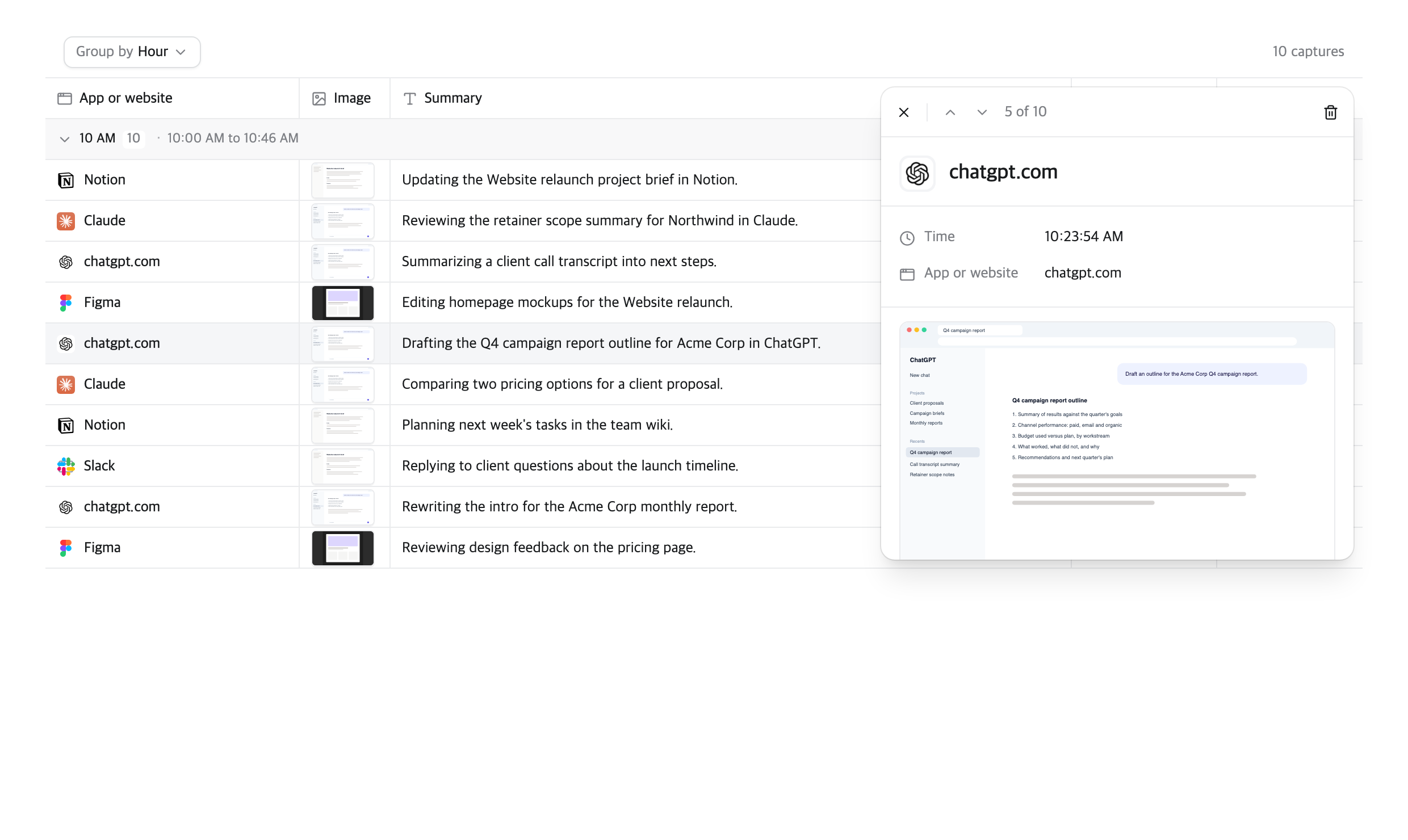
A window title like Claude or Untitled says nothing about which client you are working for. Vision is optional, private screenshots of the window you are working in. Rize summarizes each capture and uses the summary when it tags your time.
How Vision works
While the desktop app is tracking, Rize captures the window in front of you every few minutes, writes a short summary of what was on screen, and uses that summary when it drafts and tags your time entries. Time in apps that share one window title across every client, such as Claude, ChatGPT, and Notion, is where this helps most.
Captures are processed in the cloud. Vision works in the macOS and Windows desktop apps and uses AI credits.
Turn Vision on
An admin enables it for the workspace
Go to Settings > Organization > Features and switch on Vision. Choose whether Vision starts with all tracked apps and websites or only the apps members choose.
Members review their own settings
Members are on by default once an admin enables Vision. Each member can open Settings > Vision to turn Vision off for themselves, pick apps and websites, and change how often it captures.
Keep working
New time entries start using what Vision saw. Open Apps > Vision to see the captures behind them.
Choose what Vision sees
Under Settings > Vision, What Vision sees has two options:
- All tracked apps and websites: Vision captures any app or website Rize already tracks.
- Only apps members choose: Vision captures only the apps and websites switched on in the Apps and websites list.
The Apps and websites list is searchable. Enable or disable each app or website, or use Disable All to clear the list.
How often Vision captures sets the interval. The default is every 5 minutes and the shortest is 1 minute.
What Rize keeps
Summaries by default
Rize keeps the AI-written summary of each capture. The image itself is not saved unless an admin turns on Save images.
Save images is optional
With Save images on, each member can see their own images in their Vision history. Only that member can see them, and sensitive screens are never saved.
Retention
Admins set Vision retention from 1 to 30 days (30 by default), or choose Always keep.
Admins change Save images and Vision retention under Settings > Organization > Features.
Review and delete captures
Open Apps > Vision to see every capture for a day. Group rows by hour or by app, click a row to open the capture, step through captures with the arrows, and delete any capture with the trash icon.
Plans and availability
Vision needs the Pro plan or higher, or the Profit plan on current team plans. Workspaces on a trial can use it.
External agents can read your own captures with list_my_vision_captures, and get_time_entry can include what Vision saw for an entry. See the MCP tool reference.