Meetings Page and Transcripts (Beta)
Every meeting in one place, with the transcript behind it
The Meetings page lists your calendar events and the meetings Rize detects from your activity, day by day. Mark what you attended, turn a calendar event into a meeting, and connect a meeting recorder so Rize imports the transcript and tags the time to the client and project the call was about.
Turn on the beta
Open Settings > Meetings
Switch Meetings Beta on. You can also open Meetings under Track in the sidebar and click Enable Meetings Beta on the intro page.
Connect a calendar
If you have not already, connect Google Calendar or Outlook under Settings > Calendars. The Meetings page reads your events from there.
Connect a recorder
Open Meeting recorders from the gear menu on the Meetings page, or Settings > Transcription, and connect Fathom or Granola.
You can turn the beta off at any time from Settings > Meetings.
Why it matters
Meeting time has been the least accurate part of automatic tracking. Rize tracks through the active window, and during a call the active window can be Zoom, a browser tab, a notes app, or nothing useful. The calendar tells Rize when a meeting happened. The transcript tells Rize what it was about. With both, the time around a call lands on the right client, project, and task instead of on the app you happened to have open.
The Meetings page
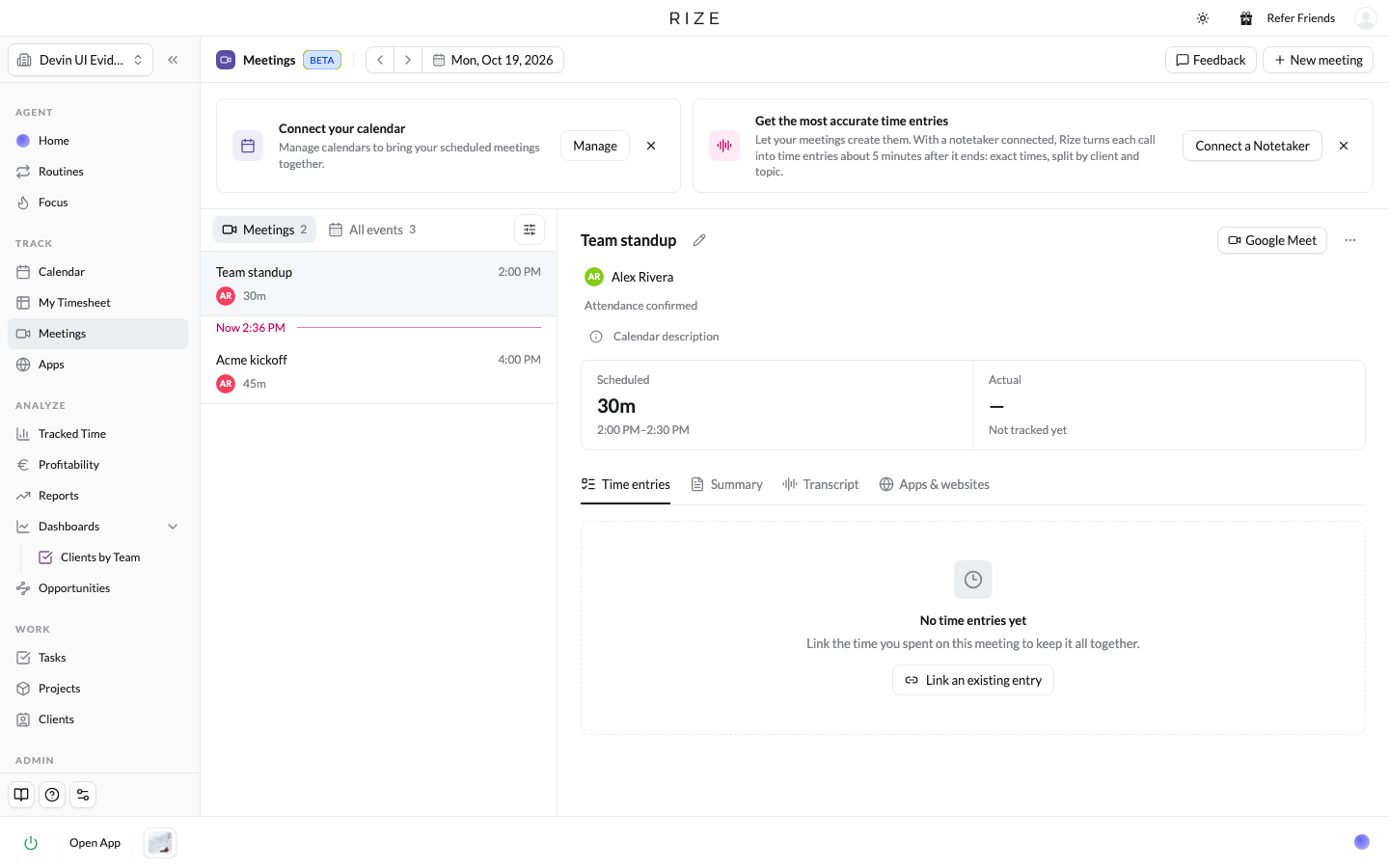
- Meetings lists the events Rize treats as meetings: calendar events with attendees that you have not declined, meetings detected from your activity, and meetings you created.
- All events lists everything on the calendar for the day, including events you marked as not attending.
- Each row shows the title, start time, up to three attendee avatars, a status pill (Calendar event, Not attending, Capturing, Scheduled now), the duration, and icons for the calendar link and transcript.
- A Now divider marks the current time.
- New meeting adds one Rize did not see, either from a calendar event or as a blank meeting with a title, start, and end.
Meeting details
Click a meeting to open it. The header shows scheduled, actual, and difference, then four tabs:
| Tab | What it shows |
|---|---|
| Time entries | The entries Rize tracked for this meeting, with their client, project, task, and labels. Change a tag here and the entry keeps its link to the meeting. |
| Summary | The summary from the transcript, if one is linked. |
| Transcript | The full transcript from your recorder. |
| Apps & websites | The activity Rize captured during the meeting. |
An upcoming meeting shows a card with Starts in and the time-entry explanation instead of the tabs. A plain calendar event shows Make this a meeting with a Create meeting button and an Always for this event or Always for this recurring event option.
Attendance
| Control | When it appears | What it does |
|---|---|---|
| I will attend / I won't attend | On the upcoming card | Records your decision ahead of time |
| Not attending | Before the meeting ends | Moves the meeting to All events and stops tracking time to it. A toast offers Undo. |
| I didn't attend | After the meeting ends | Same as Not attending, for a meeting that already happened |
| Mark as attended | In the More actions menu after the end | Records the scheduled window as attended |
| End meeting now | While the meeting is live | Ends it at the current time |
| Edit meeting | In the More actions menu | Change the name, and after the meeting, the actual start and end |
When you set actual times in Edit meeting, Rize records time for any part of the window that is not tracked yet. Tracked time is never shortened. Clear attendance decision in the same menu undoes any of the above.
Transcripts
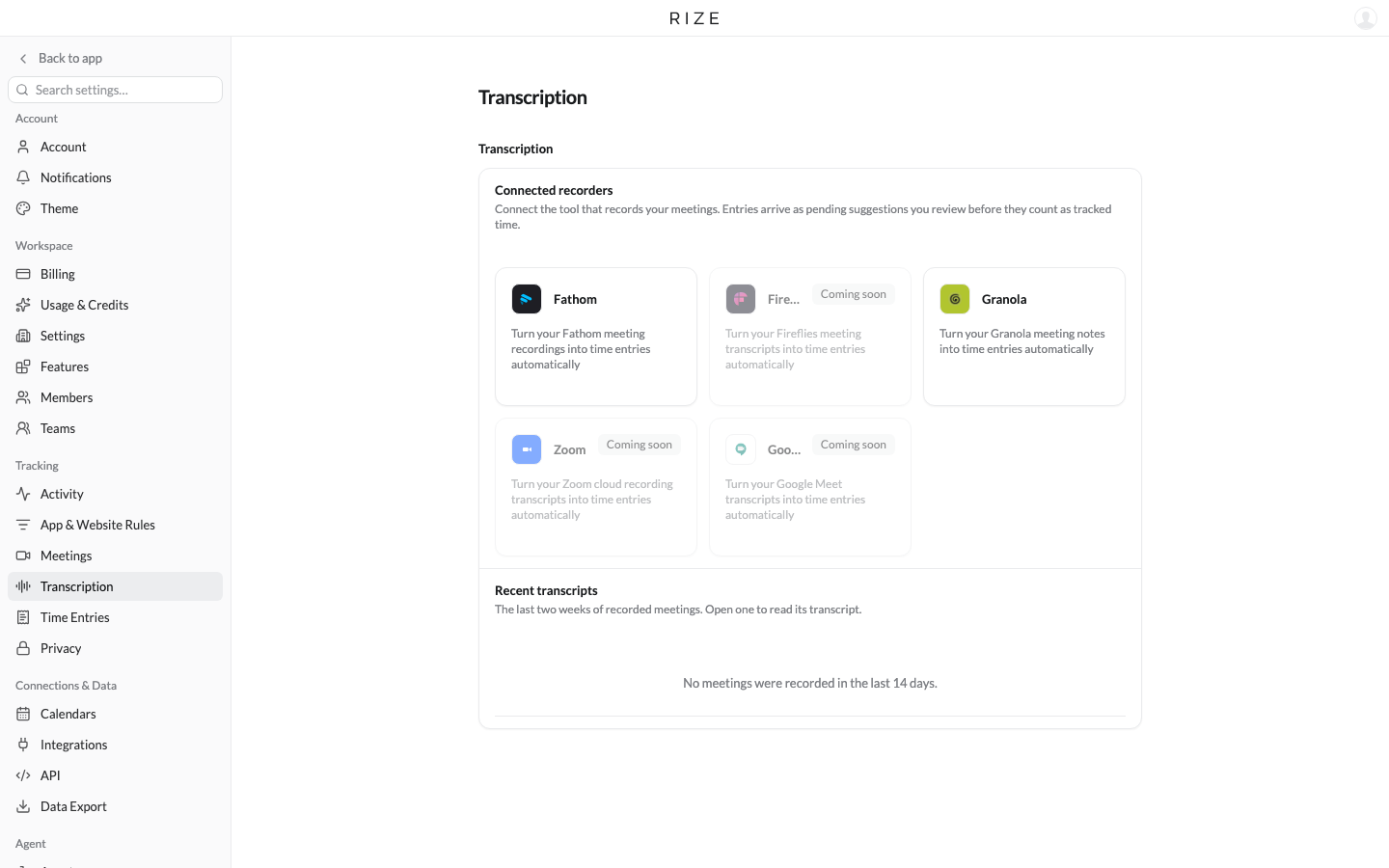
Once a recorder is connected, Rize imports each call's transcript about five minutes after the meeting ends and matches it to the meeting on the page. Then:
- Rize creates a time entry spanning the meeting, or one entry per topic if multi-entry mode is on in Settings > Transcription.
- If an entry or session already covers that time, Rize adds the transcript details to it instead of creating a duplicate.
- The entry is tagged to the client, project, and task the conversation was about, and arrives as a suggestion for you to review.
- Nothing is created for meetings you deleted or marked as not attending.
Recent transcripts in Settings > Transcription lists the last two weeks of imports.
The transcript is used to tag and describe the meeting's time entry. It does not change your calendar, and deleting a meeting in Rize keeps the recorded time, notes, and transcript.
Delete a meeting
Delete meeting in the More actions menu removes the meeting from the Meetings page and cancels its planned sessions. Recorded time, notes, and transcripts are kept, and your calendar event is unchanged.